Anatomy of an agent skill: SKILL.md, progressive disclosure and scope
SKILL.md is the entry point of an agent skill: its short description decides when the rest loads. Progressive disclosure, a minimal skill and scoping rules.
This post is also available in Deutsch.
A skill is a folder with a SKILL.md file at its root. The file starts with a short name and
description, followed by instructions. An agent keeps only the name and description in context and
reads the rest when the task matches. That loading pattern is called progressive disclosure, and it
is the reason skills exist. This post walks through the anatomy of a minimal skill, explains the
three loading levels and gives rules for keeping a skill to one job.
What a skill is
Anthropic describes the format in one sentence:
Skills are folders that include instructions, scripts, and resources that Claude can load when needed.
— Anthropic, Introducing Agent Skills
The same announcement lists portability as a design goal:
Portable: Skills use the same format everywhere.
— Anthropic, Introducing Agent Skills
A skill is know-how, not an action: it tells the agent how to do a kind of task well. It does not grant new permissions. For the difference between skills, tools and prompts, see Tool, skill or prompt?.
The minimal skill
A folder with one file is a valid skill. The file has YAML front matter with a name and a description, then Markdown instructions:
release-notes/
└── SKILL.md
---
name: release-notes
description: Draft release notes from merged pull requests. Use when asked to prepare a changelog or release announcement for a version.
---
# Release notes
1. List pull requests merged since the last tag, using the repository's own tooling.
2. Group them under Added, Changed, Fixed and Security.
3. Write one sentence per entry, in the imperative, without internal ticket numbers.
4. Mark breaking changes explicitly and put them first.
5. Output Markdown only. Do not publish or tag anything.Three details matter. The name identifies the skill. The description is the trigger: it is the text the agent sees all the time, so it has to say what the skill does and when to use it. And the last line states what the skill must not do. A skill that drafts notes should not also publish them; that would need tools and approval it has not been given.
Progressive disclosure: three levels
Anthropic’s engineering team calls this the central idea:
Progressive disclosure is the core design principle that makes Agent Skills flexible and scalable.
— Anthropic, Equipping agents for the real world with Agent Skills
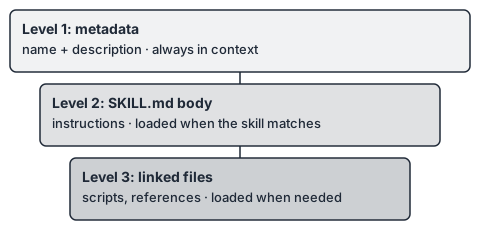
In practice there are three levels, shown in the diagram above.
- Metadata, always in context. The name and description of every installed skill. Short by design. With many skills installed, this is the only part that costs context all the time.
- The SKILL.md body, loaded when the skill matches. When the task fits a description, the agent reads the instructions. Only now do they cost context.
- Linked files, loaded on demand. Longer references, templates and scripts sit next to
SKILL.md, and the instructions point to them: “for the schema, readreference/schema.md”. The agent reads them only when a step needs them.
Why does this matter? Context is a limited resource. Anthropic’s article on context engineering puts it this way:
Context, therefore, must be treated as a finite resource with diminishing marginal returns.
— Anthropic, Effective context engineering for AI agents
and describes the goal:
good context engineering means finding the smallest possible set of high-signal tokens that maximize the likelihood of some desired outcome.
— Anthropic, Effective context engineering for AI agents
Progressive disclosure is that goal applied to guidance: the agent holds a table of contents and opens the chapter it needs. It is also the remedy for a problem described in Too many prompts, where every incident adds a paragraph to a standing prompt. Move that paragraph into a skill and it only costs context when it is relevant.
A realistic folder
When a skill grows, split it by level, not by accident:
release-notes/
├── SKILL.md              # short procedure, links to the rest
├── reference/
│   └── style-guide.md    # tone and wording rules, read when writing entries
├── templates/
│   └── notes.md          # output template
└── scripts/
    └── list_prs.sh       # deterministic helper the procedure calls
SKILL.md stays short and says when to open each file. Anything that is deterministic (listing,
sorting, validating) goes into a script, because code is more reliable than prose for mechanical
steps, and its output is smaller than the text that describes how to do it. Scripts also make the
skill more sensitive from a security point of view, which is covered below.
Rules for scope: one skill, one job
- One job, one description. If the description needs “and” twice, split the skill.
- Write the description for matching. Name the task, the input and the trigger words a user would use. A vague description loads at the wrong time or never.
- Say when not to use it. One sentence about neighbouring tasks prevents false matches.
- Keep the body short. Aim for a procedure that fits on one screen, and link out for details.
- Put variants in files, not branches. Instead of one body that handles five formats, keep one reference file per format and let the body say which to read.
- State the outputs. Format, location, and what the skill must not do.
- No hidden permissions. If a step needs a tool, network access or write access, say so in the skill and make sure the platform grants it explicitly. A README sentence is not a grant.
- Name an owner and a version. Skills are maintained like code.
Skills are a supply chain
A skill is text that steers the model, and it may include scripts that run. Installing one belongs in the same category as adding a dependency. Anthropic’s guidance is direct:
When installing a skill from a less-trusted source, thoroughly audit it before use.
— Anthropic, Equipping agents for the real world with Agent Skills
A short review routine:
- Where does it come from, and who maintains it?
- Pin a version or commit and keep a reviewed copy in your own repository.
- Read
SKILL.mdand every linked file for instructions that go beyond the stated job. - Read every script. Look for network calls, writes outside the working directory and downloads.
- Check that the description matches what the body does.
- Re-review when it changes.
Because a skill cannot grant itself permissions, the damage a bad one can do is limited by what the agent’s tools allow. That is a reason to grant tools narrowly, as described in What is an agent harness, and not a reason to skip the review.
Testing a skill
Write three or four realistic requests, including one that should not trigger the skill. Check that the skill loads when it should, that it does not load otherwise, and that following it produces the output you expect. When it fails to load, fix the description first. When the output is wrong, fix the body or the linked file that the failing step reads.
Key takeaways
- A skill is a folder with a
SKILL.md; its name and description are the only part always in context. - Progressive disclosure has three levels: metadata, body on match, linked files on demand.
- The description is the trigger. Write it for matching, and say when not to use it.
- Keep a skill to one job, keep the body short, and move deterministic steps into scripts.
- Treat skills as supply chain: pin, read, review. They cannot grant permissions, but they can steer an agent toward misusing the ones it has.
Sources
- Anthropic, Equipping agents for the real world with Agent Skills (2025-10-16)
- Anthropic, Introducing Agent Skills (2025-10-16)
- Anthropic, Effective context engineering for AI agents (2025-09-29)