Claude Code hooks as policy enforcement points for coding agents
Claude Code hooks run code before a tool call, so a PreToolUse hook can enforce policy locally. How to write one, where it stops and why a central gate stays.
This post is also available in Deutsch.
Claude Code hooks are small programs the harness runs at fixed points in an agent’s lifecycle, and a
PreToolUse hook can inspect a tool call and block it before it executes. That makes hooks a practical
local policy enforcement point: deterministic code, outside the model, that says yes or no. They are also
local, which sets their limit. A hook runs where the agent runs, under the control of whoever controls
that machine, so it complements a central policy gate and does not replace it. This post shows how to use
hooks well and where to stop relying on them.
What a hook is
The Claude Code documentation describes hooks as commands that run on events:
execute automatically at specific points in Claude Code’s lifecycle.
Source: Claude Code docs, Hooks reference (live documentation,
quoted as fetched on 2026-10-04). The point that matters for governance is automatically and outside the
model. A prompt that says “never run rm -rf” is a request. A hook that rejects the command is a rule,
because the model cannot talk its way past a script that does not read the conversation.
Events differ in what they can do. The ones used most for policy:
- Before a tool call (
PreToolUse): inspect the tool name and arguments, allow, deny or ask. - After a tool call (
PostToolUse): record results, scan output, flag anomalies. The action has already happened, so this is detection, not prevention. - When a prompt is submitted or a session starts: add context, check conditions, log.
Check the reference for your version for the exact event names, the input format and how a hook signals its decision, because these details evolve.
A minimal PreToolUse hook
The configuration registers a command for a tool matcher. A sketch:
{
  "hooks": {
    "PreToolUse": [
      {
        "matcher": "Bash",
        "hooks": [
          { "type": "command", "command": ".claude/hooks/check-bash.py" }
        ]
      }
    ]
  }
}
The hook receives a JSON description of the pending call on standard input and answers through its exit code and output. A simple script that blocks a few clearly dangerous patterns:
#!/usr/bin/env python3
import json, re, sys

call = json.load(sys.stdin)
command = call.get("tool_input", {}).get("command", "")

DENY = [
    r"\brm\s+-rf\s+(/|~)",          # recursive delete of root or home
    r"\bcurl\b.*\|\s*(sh|bash)",    # pipe a download into a shell
    r"\bgit\s+push\b.*--force",     # history rewrite
]

for pattern in DENY:
    if re.search(pattern, command):
        # Message goes back to the agent so it can choose another approach.
        print(f"Blocked by policy: matches {pattern}", file=sys.stderr)
        sys.exit(2)   # a blocking exit code in Claude Code; verify for your version

sys.exit(0)
Three details make this useful in practice. The message tells the agent why, so it adapts instead of retrying. The hook is fail-closed where it matters: if parsing fails, decide deliberately whether to block or allow. And the hook lives in version control, so changes to policy are reviewed like code.
Patterns that work well
- Allow-list rather than deny-list for high-risk tools. Deny patterns are easy to bypass with quoting, aliases or a script file. For shell access, prefer “these commands are allowed” over “these are forbidden”, or restrict the tool entirely.
- Check arguments, not only names. The same tool can be harmless or dangerous depending on its path, host or flags. Validate against the shapes you expect.
- Protect configuration paths. Block edits to the hook scripts and settings themselves. An agent that can edit its own policy has no policy.
- Normalise before matching. Resolve paths and strip obvious indirection before comparing, so
./a/../../etc/passwdis seen for what it is. - Log every decision. Write allow and deny decisions to an append-only record with the arguments and a timestamp. If an incident occurs, this is the first thing you read; see policy decides, audit proves.
- Keep hooks fast. A slow hook slows every tool call. Do cheap local checks in the hook and send expensive ones to a service.
Where hooks stop
Hooks are valuable, and they have limits you should state plainly in your threat model.
- They run where the agent runs. A developer who controls the machine can disable or edit a local hook unless configuration is managed centrally and locked. A hook is therefore a guardrail for honest mistakes and for a hijacked agent, not a control against a malicious local user.
- They are per harness. A hook written for one tool does not apply to another. If your organisation uses more than one coding agent, you maintain parallel policies; the comparison of Claude Code and OpenCode shows how the permission models differ.
- They only see what the harness exposes. Actions taken by a subprocess the tool spawns, or by a remote service the tool calls, are outside the hook’s view unless you also restrict them with a sandbox.
- Pattern matching is incomplete. A regular expression over a shell command cannot understand every way to express an action.
- They are not a source of truth for audit. Each machine keeps its own log. Central reporting requires you to ship and protect those logs.
The OpenAI Agents SDK documentation is a useful reminder that guardrails everywhere have scope limits. In that SDK:
Output guardrails run only for the agent that produces the final output.
Source: OpenAI Agents SDK docs, Guardrails (live documentation, quoted as fetched on 2026-10-04). Whatever the framework, ask of every guardrail: for which agents, which steps and which data does it actually run?
Local hook plus central gate
The sound arrangement is two layers with different jobs.
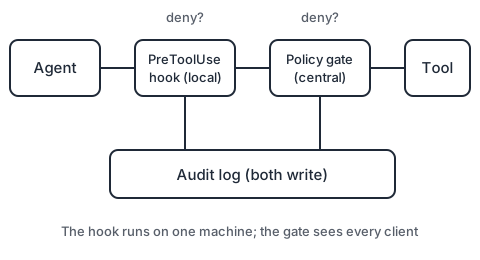
- The local hook gives the developer immediate, low-latency feedback, blocks the obvious, and keeps the harness honest even when offline.
- The central gate evaluates every call from every client against one policy, using the acting identity, and writes the authoritative audit record. It cannot be edited from the developer’s laptop.
This is the same idea as zero trust, which NIST describes in terms that fit agents well:
Zero trust assumes there is no implicit trust granted to assets or user accounts based solely on their physical or network location
Source: NIST SP 800-207, Zero Trust Architecture. An agent running inside your network, on your developer’s laptop, with your credentials, deserves no implicit trust either. Every call is checked, and the checks you can trust most are the ones that do not run on the machine being checked.
What to do first
- Write down five actions that must never happen without a person, and implement them as a
PreToolUsehook in a shared repository. - Make the hook configuration part of the repository’s managed settings so it is the default for everyone.
- Log decisions centrally, even if only to a shared file or collector at first.
- Test the hook with adversarial inputs: quoting tricks, path traversal, a command inside a script.
- Decide which of the five belong in a central gate, and plan that move. See human in the loop that works for how to handle the approvals that remain.
Key takeaways
- Hooks run deterministic code outside the model, so they enforce rules instead of requesting them.
- A
PreToolUsehook can block a call with a reason the agent can act on; keep it small, fast and in version control. - Prefer allow-lists, validate arguments, protect the hook’s own files and log every decision.
- Hooks are local and per-harness; pair them with a central gate and a sandbox for enforcement you can audit.
Sources
- Anthropic, Hooks reference (Claude Code docs) (live documentation).
- OpenAI, Guardrails (OpenAI Agents SDK docs) (live documentation).
- NIST, SP 800-207, Zero Trust Architecture (2020).