Prompt hygiene: a checklist for teams drowning in prompts
Prompt management for teams: a checklist covering owner, version, eval, scope and review, plus the rule to move repeated know-how into skills.
This post is also available in Deutsch.
Prompt management comes down to treating prompts like code that other people depend on: every prompt gets an owner, a version, a test, a clear scope and a review date, and any text that appears in more than one place moves into a shared skill. Teams that skip this end up with dozens of near-identical, unowned and untested prompts, the agent version of copy-pasted code. This post gives a checklist you can apply in an afternoon.
How prompts pile up
Nobody plans a prompt mess. It grows from reasonable steps: someone writes a system prompt that works; a colleague copies it and adjusts two lines; a third person adds a paragraph after a bad incident; the original author leaves. A year later there are forty variants, nobody knows which one is current, and a fix in one never reaches the others. Our earlier post on prompt sprawl and AI slop describes how this feeds low-quality output at scale.
The costs are real:
- Inconsistent behaviour. Two agents with “the same” instructions act differently.
- Slow fixes. A correction has to be found and applied in every copy.
- Hidden risk. Old prompts keep permissions and instructions nobody reviewed.
- Wasted context. Long, repetitive prompts use up attention. Anthropic’s guidance on context says:
Context, therefore, must be treated as a finite resource with diminishing marginal returns.
Source: Anthropic, Effective context engineering for AI agents (2025-09-29).
Hygiene is the habit that keeps the pile from growing.
The checklist
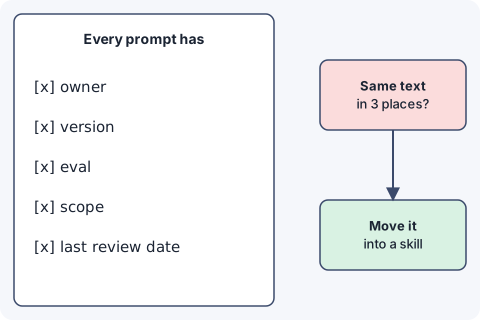
Apply these five checks to every prompt that runs in production. A prompt that fails any of them is not ready, or is due for retirement.
1. Owner
- A named person or team answers for this prompt.
- The owner is recorded next to the prompt, not in someone’s head.
- When the owner leaves, ownership is reassigned or the prompt is retired.
An unowned prompt is a liability: nobody notices when it drifts.
2. Version
- The prompt lives in version control, not in a UI field or a chat message.
- Every change has a message that says why it was made.
- Running agents reference a specific version, so you can tell which text produced which behaviour.
For skills, versioning agent skills describes a scheme that works for prompts too.
3. Eval
- At least a handful of test cases exist: inputs with the outcome you expect.
- They run automatically when the prompt changes.
- A failing case blocks the change, or the owner accepts it explicitly.
You do not need hundreds of cases. Five to ten that cover the main task and the known failure modes already catch most regressions. How output is checked before it reaches users is covered in quality gates for agent output.
4. Scope
- The prompt says what the agent is for and what it must not do.
- It mentions only tools that agent actually has.
- It does not carry instructions for other tasks “just in case”.
Narrow prompts are shorter, cheaper and easier to test. The same logic applies to tool names: Anthropic’s guidance on writing tools notes that
Namespacing (grouping related tools under common prefixes) can help delineate boundaries between lots of tools; MCP clients sometimes do this by default.
Source: Anthropic, Writing effective tools for AI agents (2025-09-11).
Clear boundaries help the model and the people reading the prompt.
5. Last review
- A review date is recorded.
- Prompts not reviewed within the agreed period (for example six months) are flagged.
- Reviews check the prompt against the current model, tools and policies.
A prompt written for last year’s model and tools may carry workarounds that no longer apply, or miss capabilities it should use.
A simple record that satisfies all five:
prompt: support-triage-system
owner: support-platform
version: 1.4.0
scope: classify incoming tickets; no replies, no account changes
tools: [tickets.read, kb.search]
eval: evals/support-triage.yaml   # 12 cases, runs in CI
last-reviewed: <date>
The rule for repeated text: move it into a skill
The single most effective hygiene rule is this: if the same know-how appears in more than one prompt, it does not belong in prompts. Put it in a skill and let prompts refer to it.
Typical candidates:
- how to format a report or a ticket,
- how to read a particular log or dataset,
- your escalation rules,
- the review checklist for a type of change.
A skill is one place to fix, version and review. The Agent Skills specification gives the basic shape:
The SKILL.md file must contain YAML frontmatter followed by Markdown content.
Source: Agent Skills specification.
and it also gives the advice that keeps skills lean:
Consider splitting longer SKILL.md content into referenced files.
The goal mirrors what the context guidance says about prompts in general:
good context engineering means finding the smallest possible set of high-signal tokens that maximize the likelihood of some desired outcome.
Source: Anthropic, Effective context engineering for AI agents.
The prompt stays short and specific to the agent; the shared procedure lives once, and is loaded when needed. For a project-wide version of the same idea, an AGENTS.md file holds facts that apply to the whole repository.
An afternoon cleanup plan
- Inventory. List every production prompt: where it lives, who uses it, who wrote it. Expect surprises.
- Find duplicates. Search for repeated sentences and paragraphs. Group the clusters.
- Extract. Move each repeated block into one skill or shared snippet, then replace the copies with a reference.
- Assign owners. Every survivor gets a name. Prompts nobody claims get a deadline, then removal.
- Add the five fields (owner, version, scope, eval, last review) to every prompt.
- Write a first eval for the three most important prompts.
- Automate the nag. A scheduled job lists prompts past their review date.
What hygiene does not fix
- It will not make a weak prompt strong; evals tell you whether it is.
- A passing eval does not guarantee good behaviour outside the cases you wrote.
- Process has a cost. For a one-off experiment, a full record is overkill. Apply the checklist when a prompt starts to matter to other people.
- Moving text into skills adds a hop. Keep skills small, and do not extract something used only once.
Key takeaways
- Treat prompts as code others depend on: owner, version, eval, scope, last review.
- Keep prompts in version control and reference specific versions.
- A handful of eval cases catch most regressions; run them on every change.
- Repeated know-how moves into skills; prompts stay short and specific.
- Review on a schedule, and retire prompts nobody owns.
Sources
- Effective context engineering for AI agents, Anthropic, 2025-09-29.
- Specification - Agent Skills, agentskills.io.
- Writing effective tools for AI agents—using AI agents, Anthropic, 2025-09-11.