AI agent sandboxing: filesystem and network isolation together
AI agent sandboxing works only when file access and network egress are both limited. Why one boundary is not enough and how allow-lists cut approvals.
This post is also available in Deutsch.
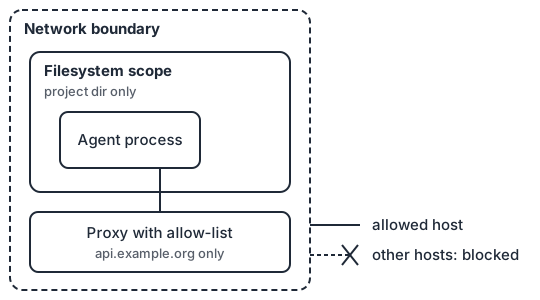
AI agent sandboxing needs two boundaries, not one: a filesystem boundary that limits what the agent can read and write, and a network boundary that limits where it can send data. With only the first, a compromised agent can read what it is allowed to read and post it to any server. With only the second, it can reach nothing outside, but it can still overwrite your SSH config or read another project’s secrets. This post explains why both belong together, how to build an egress allow-list, and why a good sandbox is also the best answer to approval fatigue.
Why one boundary is not enough
Think about what a prompt injection needs to do real damage. It needs to get some data (read access) and move it somewhere (a channel out), or it needs to change something that matters (write access). Each boundary removes one half.
| Setup | What a hijacked agent can still do |
|---|---|
| No sandbox | Read any file the user can read, send it anywhere, modify anything |
| Filesystem only | Read the files in scope and send them to any host |
| Network only | Modify or read files outside the project, but not exfiltrate directly |
| Both | Touch only the project directory and talk only to listed hosts |
This is the same shape as the lethal trifecta: untrusted input, access to private data and a way to communicate externally. A sandbox is one of the few controls that removes the third leg regardless of what the model decides to do. Anthropic’s engineering team states the requirement directly:
It is worth noting that effective sandboxing requires both filesystem and network isolation.
Source: Anthropic, Making Claude Code more secure and autonomous with sandboxing.
The filesystem boundary
Keep the rule simple: the agent can write inside its working directory and read what its task needs, nothing else.
- Scope writes to the project or a scratch directory. Everything else is read-only or invisible.
- Hide credential locations. Home-directory dotfiles, cloud credential files, SSH keys and browser profiles should not be readable at all. Hiding is stronger than denying, because the agent cannot even learn the path exists. See secrets for agents for how to hand over credentials without putting them on disk.
- Protect your own configuration. If the agent can edit its own settings, hooks or startup files, it can widen its own permissions on the next run. Make those paths read-only.
- Use disposable workspaces. A fresh checkout or container per run limits what an unnoticed change can persist.
On Linux this is usually done with namespaces, bind mounts and seccomp or with a container; on macOS with the system sandbox. You rarely need to build it yourself, but you should know which one your tool uses and what it does not cover.
The network boundary and egress allow-lists
The network boundary turns “any host” into “these hosts”. The most practical form is a proxy that is the only route out, with a deny-by-default list.
# Illustrative egress policy, not tied to a specific product
egress:
  default: deny
  allow:
    - host: api.example.org          # the model provider or gateway
    - host: registry.example.org     # package mirror, read-only
    - host: git.example.org
      methods: [GET]                 # fetch, but no pushes from inside the sandbox
  log: denied                        # every blocked attempt becomes an event
Some practical points:
- Start from deny and add hosts as the task needs them. Starting open and trying to close later never converges.
- Prefer package mirrors you control to the public registries, so the list stays short and reviewable.
- Watch for allowed-host abuse. A broad host such as a code-hosting site or a paste service can still serve as a drop box. Allow the narrowest hostname and path you can, and treat broad hosts as open channels.
- Resolve names at the proxy. Raw IP connections and DNS tunnelling are bypasses; block direct connections and let only the proxy resolve names.
- Make denials visible. A blocked connection is a signal, both for the user and for monitoring. The Claude Code documentation describes exactly this behaviour:
When the sandbox blocks a network connection, Claude Code names the denied host in the command’s result, so Claude sees what was blocked.
Source: Claude Code docs, sandboxed Bash tool (live documentation, quoted as fetched on 2026-10-04). It matters because the agent can then ask for the host explicitly, and a person can decide once, instead of the agent trying workarounds.
Sandboxing is an approval-fatigue control
Permission prompts are a security mechanism with a known failure mode: people stop reading them. If the agent asks “run this command?” thirty times an hour, the thirty-first answer is a reflex. A sandbox changes the economics. Inside the boundary, actions are low risk and can run without asking; outside it, the request is rare enough to deserve attention. Anthropic reports the effect from its own use:
In our internal usage, we’ve found that sandboxing safely reduces permission prompts by 84%.
Source: same article as above. That number comes from one team’s usage and is not a promise for your workload, but the mechanism is general: fewer, better prompts. The follow-up question, how to design those remaining approvals, is the subject of a later post in this series.
Where sandboxing fits in least privilege
OWASP names the root cause of excessive agency in three parts:
The root cause of Excessive Agency is typically one or more of: excessive functionality; excessive permissions; excessive autonomy.
Source: OWASP LLM06:2025 Excessive Agency. A sandbox addresses the “permissions” part at the process level. It does not replace the other two: remove tools the agent does not need (functionality) and gate risky actions (autonomy). The principle is developed in least privilege for agents, where each agent in a pipeline holds only the tools its step requires. Sandbox plus per-agent tool grants gives you two independent layers.
What a sandbox does not do
- It does not stop misuse of allowed access. An agent permitted to write the project can still write bad code there. Review and tests remain necessary.
- It does not protect data inside the scope. If the secret is in the project directory, the agent can read it. Keep secrets out of the workspace.
- It is not a perimeter against everything. Kernel bugs and misconfiguration exist. Treat the sandbox as one layer, not the layer.
A short checklist
- Writes limited to the working directory; sensitive paths hidden, not just denied.
- The agent’s own configuration is read-only to the agent.
- A single proxy route out, deny by default, narrow allow-list, denials logged.
- No long-lived secrets in the workspace or the environment.
- Disposable workspace per run where practical.
- A tested way to widen the sandbox for one task, with a person deciding.
Key takeaways
- Filesystem isolation without network isolation lets data leave; network isolation without filesystem isolation lets the agent reach files it should not touch.
- Use a deny-by-default egress proxy with a short, reviewable allow-list and visible denials.
- Sandboxing reduces approval fatigue, which makes the remaining approvals more meaningful.
- It is one layer next to least privilege, secret handling and review.
Sources
- Anthropic, Making Claude Code more secure and autonomous with sandboxing (2025).
- Anthropic, Configure the sandboxed Bash tool (Claude Code docs) (live documentation).
- OWASP Gen AI Security Project, LLM06:2025 Excessive Agency.