AGENTS.md: one predictable place for project context
AGENTS.md is a Markdown file at the repository root with build steps, conventions and limits for coding agents. What belongs in it and what in skills.
This post is also available in Deutsch.
AGENTS.md is a plain Markdown file in the root of a repository that tells a coding agent how the project works: how to build and test it, which conventions to follow and what not to touch. Keep it short, keep it about the project as a whole, and move step-by-step procedures into skills. That split is the whole idea, and the rest of this post explains how to apply it.
What AGENTS.md is
The project site describes the format in one sentence:
Think of AGENTS.md as a README for agents: a dedicated, predictable place to provide the context and instructions
Source: agents.md.
The word that matters is predictable. A README is written for people and varies wildly. An agent that starts in an unfamiliar repository would otherwise have to guess where the build command lives, whether tests need a database and which directories are generated. A file with a fixed name at a fixed location removes that guess, for every tool that reads it.
The format is no longer a side project of one vendor. When the Linux Foundation announced the Agentic AI Foundation, it named AGENTS.md among the first projects:
Its inaugural projects, AGENTS.md, goose and MCP, lay the groundwork for a shared ecosystem of tools, standards, and community-driven innovation.
Source: Linux Foundation, 2025-12-09.
The file has no required schema. It is Markdown, and the agent reads it as text. That is a strength (anyone can write one in five minutes) and a weakness (nothing stops it from growing into a wall of prose).
Where it sits in a repository
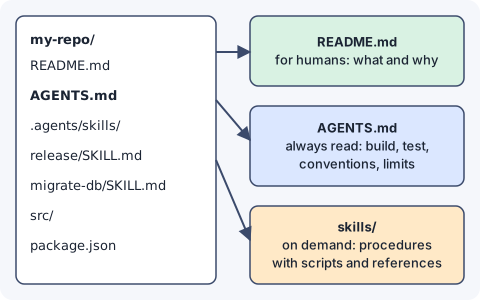
Three artefacts have three audiences:
- README.md is for humans who want to know what the project is and why it exists.
- AGENTS.md is for agents that need to work in the repository. It is loaded into context at the start of a session, so everything in it costs tokens every time.
- Skills are for procedures that only matter some of the time, such as cutting a release or running a database migration. They are loaded on demand. See the anatomy of an agent skill for the structure.
If you are unsure where a piece of information goes, ask how often the agent needs it. “Every task” means AGENTS.md. “Sometimes, and then in detail” means a skill. “Never, but a person might” means the README.
Why short beats complete
Everything in AGENTS.md competes for the same limited attention as the task itself. Anthropic’s engineering team puts it plainly:
Context, therefore, must be treated as a finite resource with diminishing marginal returns.
And the goal that follows from it:
good context engineering means finding the smallest possible set of high-signal tokens that maximize the likelihood of some desired outcome.
Source: Anthropic, Effective context engineering for AI agents, 2025-09-29.
For an instructions file this means every line should pass a test: would the agent get something wrong without it? “Write clean code” fails the test. “Run pnpm test:unit before committing; the integration suite needs Docker and takes ten minutes, so do not run it unless asked” passes. Our own context engineering basics go deeper on why this budget matters.
What belongs in AGENTS.md
A useful file usually has five short sections.
- Project in one paragraph. What the code does and the main moving parts.
- Commands. Install, build, test, lint, and how to run a single test. Exact commands, in code blocks.
- Conventions. Language version, formatting, naming, commit message format, where new files go.
- Boundaries. Directories that are generated, files that must not be edited by hand, services that must not be called from tests.
- Gotchas. The two or three things that have burned people before: a flaky test, an environment variable that must be set, a migration order.
A compact example:
# AGENTS.md

Billing service (TypeScript, Node 22). API in `src/api`, jobs in `src/jobs`.

## Commands
- Install: `pnpm install --frozen-lockfile`
- Unit tests: `pnpm test:unit` (single file: `pnpm test:unit path/to/file`)
- Lint and types: `pnpm check`

## Conventions
- Conventional Commits, English, imperative.
- New endpoints need a test in `test/api` and an entry in `openapi.yaml`.

## Boundaries
- `src/generated/` is produced by `pnpm codegen`; never edit it.
- Tests must not call the real payment provider; use `test/fakes`.

## Gotchas
- `DATABASE_URL` must point at the test database or migrations will run on dev data.
That is under twenty lines and covers most of what an agent needs on day one.
What belongs in a skill instead
The tempting failure mode is to keep adding sections: release process, incident handling, how to write a changelog, how to migrate the database. Each is useful, and none is needed for most tasks. Together they turn a ten-line file into a document the agent has to read before every change.
Move any block that has all of these properties into a skill:
- it is a procedure with steps, not a fact or a rule,
- it applies to one kind of task,
- it may need scripts or reference files next to it.
AGENTS.md then keeps a single line pointing to it, for example “Releases: use the release skill”. The agent pays for the full text only when it does a release. If you are deciding between a skill, a tool and a prompt for something new, tool, skill or prompt gives a decision guide.
Keeping the file honest
An instructions file is code that nobody compiles, so it rots. Some habits keep it useful:
- Treat changes like code. Review them in pull requests. A wrong command in AGENTS.md misleads every agent run.
- Delete when the agent stops needing it. If a gotcha was fixed in the code, remove it.
- Test it. Start a fresh session with a small task and see whether the agent follows the commands without extra hints. Every correction you have to give is a candidate line.
- Do not put secrets in it. The file is committed and read by tools. Point to where credentials come from; never include them.
- Do not duplicate the README. Link to it for background instead of copying.
- Know the limits. The file is advice. It does not enforce anything. If something must never happen, such as writing to production, enforce it with permissions and sandboxing, not with a sentence.
Key takeaways
- AGENTS.md is a README for agents: a fixed name at a fixed place, plain Markdown.
- Context is finite, so write the smallest set of lines that prevents mistakes.
- Put project-wide facts in AGENTS.md: commands, conventions, boundaries, gotchas.
- Put procedures that apply to one kind of task into skills and link to them in one line.
- Review the file like code, prune it regularly and never rely on it for enforcement.
Sources
- AGENTS.md, the format’s home page.
- Linux Foundation announces the formation of the Agentic AI Foundation, 2025-12-09.
- Effective context engineering for AI agents, Anthropic, 2025-09-29.