Ops series: LLM FinOps for agents, attributing every token
LLM FinOps applies the cloud playbook to agents: tag every run, attribute spend per key and team, set budgets, alert early and export usage to cost reports.
This post is also available in Deutsch.
LLM FinOps means treating model spend like any other cloud cost: tag every run, attribute each token to an owner, set budgets, alert before they are exceeded and review the numbers regularly. The tooling is not exotic. Per-key tracking in a gateway and OpenTelemetry export from your coding agents cover most of it. This post is part of our operations series and shows a practical setup.
The FinOps loop for agents
Cloud FinOps boils down to five verbs, and they carry over unchanged:
- Tag. Every call carries labels that say who and what it belongs to.
- Attribute. Spend is grouped by those labels: tenant, team, agent, use case.
- Budget. Each group gets a limit, set by the people who pay.
- Alert. Someone is told at 50, 80 and 100 percent, not on invoice day.
- Review. A recurring meeting looks at outliers and decides what to change.
The difference with agents is that a single user request fans out into many model calls and tool calls, so attribution has to work at the level of a run, not of an API request. For why this belongs in the platform rather than in each application, see cost is a platform concern.
Why a cap is not optional
Agents loop. A retry that never converges, a tool that returns huge output, a prompt that grows with every turn: each can turn a cheap task into an expensive one without any attacker involved. OWASP lists this class of problem as a risk of its own:
Unbounded Consumption occurs when a Large Language Model (LLM) application allows users to conduct excessive and uncontrolled inferences
Source: LLM10:2025 Unbounded Consumption, OWASP Gen AI Security Project. The same page treats it as a security topic (denial of service, cost exhaustion), which is a good reason to involve security and finance in the same conversation.
Per-key and per-team spend tracking
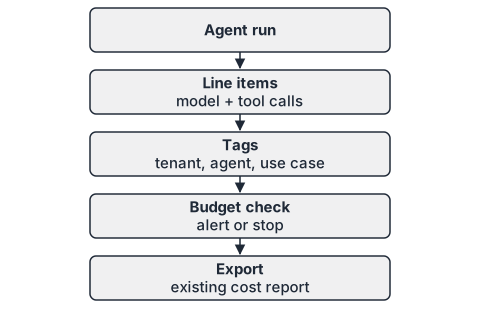
The simplest attribution mechanism is one credential per consumer. If every team, agent or use case calls the model through its own key, the provider or your gateway can total the spend per key. The LiteLLM proxy documents this as virtual keys:
Spend is automatically tracked for the key
Source: Virtual Keys, LiteLLM docs, live documentation, wording as fetched on 2026-10-04. A key can carry a budget and metadata, so the same object answers both “how much did this consumer spend?” and “stop when it reaches X”. If you bring your own provider keys, see BYOK explained for the trade-offs between provider-side and platform-side tracking.
A configuration sketch for a gateway-style key (field names vary by product, check your gateway’s documentation):
{
  "key_alias": "support-triage-prod",
  "max_budget": 250.0,
  "budget_duration": "30d",
  "metadata": {
    "tenant": "example-tenant",
    "team": "support",
    "agent": "triage",
    "use_case": "ticket-classification"
  }
}
Three habits make this useful:
- One key per agent and environment. Sharing a key between production and experiments makes the numbers meaningless.
- Stable tag vocabulary. Agree on tenant, team, agent and use case, and write the allowed values down. Free-text tags fragment quickly (“support”, “Support”, “support-team”).
- Keys are credentials. Rotate them, scope them and never put them in prompts or logs.
Exporting usage from coding agents
Developer tools need the same treatment. Claude Code can export telemetry through OpenTelemetry. The monitoring documentation describes the purpose:
Track Claude Code usage, costs, and tool activity across your organization by exporting telemetry data through OpenTelemetry (OTel).
Source: Monitoring, Claude Code docs, live documentation, wording as fetched on 2026-10-04. Because the data arrives as standard OTel metrics and events, you can send it to the collector and backend you already run and join it with team and cost-centre labels there. A minimal collector pipeline looks like this:
receivers:
  otlp:
    protocols:
      grpc: {}
processors:
  batch: {}
  attributes/team:
    actions:
      - key: team
        value: platform
        action: upsert
exporters:
  prometheus:
    endpoint: 0.0.0.0:8889
service:
  pipelines:
    metrics:
      receivers: [otlp]
      processors: [attributes/team, batch]
      exporters: [prometheus]
Check the monitoring page for the metric names and environment variables your version supports; do not copy names from a blog post, including this one.
Budget checks and alerts
Tracking tells you what happened; budgets change what happens next. A workable policy:
- Soft limit at 80 percent: notify the owner of the key and the team channel.
- Hard limit at 100 percent: block new runs for that key, or require approval from a named person.
- Per-run ceiling: stop a single run that exceeds a multiple of the usual cost for its use case. This catches loops long before the monthly budget does.
Prompt caching and token budgets reduce the base cost and are covered in prompt caching and token budgets. Budgets and caching complement each other: caching lowers the price of a run, the budget caps the damage when a run misbehaves.
Reporting and chargeback
Finance does not want another dashboard. Export attributed usage as a table they can load into the existing cost report:
month,tenant,team,agent,use_case,model,input_tokens,output_tokens,cost
2026-07,example-tenant,support,triage,ticket-classification,model-a,18200000,2100000,142.80
Decide early whether this is showback (teams see their costs) or chargeback (costs are billed to their budget). Showback is an easier start and usually enough to change behaviour. Keep a line for unattributed spend and watch it: a growing “unknown” bucket means tagging has gaps.
Limits of this approach
- Tags are only as good as the discipline behind them; untagged calls land in “unknown”.
- Shared infrastructure (embedding services, vector stores, evaluation runs) needs a rule for how its cost is split.
- Token cost is not total cost: people reviewing agent output, retries and tool-side compute are outside these numbers.
- Prices and billing units differ per provider; verify them against the current price list instead of hard-coding them.
Key takeaways
- Apply the cloud loop: tag, attribute, budget, alert, review.
- Use one key per agent and environment so spend can be totalled per consumer.
- Export telemetry from coding agents via OpenTelemetry into the stack you already run.
- Combine monthly budgets with a per-run ceiling to catch loops early.
- Report in the format finance already uses, and track the unattributed share.
Sources
- Virtual Keys (LiteLLM docs), live documentation, wording as fetched 2026-10-04.
- Monitoring (Claude Code docs, Anthropic), live documentation, wording as fetched 2026-10-04.
- LLM10:2025 Unbounded Consumption (OWASP Gen AI Security Project)