Ops series: AI incident response when the actor is an agent
AI incident response keeps the classic phases but needs a kill switch, tool revocation and policy freeze in seconds. A playbook for agent incidents.
This post is also available in Deutsch.
AI incident response follows the same phases as any other incident response: prepare, detect, contain, recover, learn. What changes is the speed and the shape of containment. An agent can make hundreds of tool calls while a person is still reading the alert, so you need controls that stop a run, revoke a tool and freeze a policy in seconds, not after a ticket has been triaged. This post adapts a standard incident playbook and the blameless postmortem to incidents where the actor is an agent.
Why agent incidents feel different
A conventional incident usually has a bounded actor: a leaked key used by a script, a bad deploy, a misconfigured bucket. An agent incident has three properties that make it harder in practice.
- The actor decides at run time. Which tools get called, and with which arguments, depends on the model’s output, which depends on every piece of text in its context. You cannot read the code to predict the next step.
- The actor is fast and parallel. Several runs may be going at once, each calling tools that change real systems.
- The cause may be text. A prompt injection in a ticket, a poisoned tool description or a misleading document can steer a run without any change to code or configuration.
None of this makes the discipline new. NIST’s revised incident response guidance frames incident response as part of overall risk management and says that doing the preparation work pays off:
Doing so can help organizations prepare for incident responses, reduce the number and impact of incidents that occur
Source: NIST SP 800-61 Rev. 3. The sentence is about organisations in general, and it applies unchanged to an agent platform: the controls you need at 3 a.m. must exist before 3 a.m.
The threat side is not hypothetical either. Anthropic reported a campaign in which attackers used an agent to do most of the work:
the threat actor was able to use AI to perform 80-90% of the campaign
Source: Anthropic, Disrupting an AI-orchestrated cyber espionage campaign. Whether your next incident comes from an attacker using agents or from your own agent misbehaving, the response has to assume a fast, automated actor.
Prepare: the controls that must exist beforehand
Before the first incident, make sure the following exist and have been tried once in a drill.
- A run-level kill switch. One action that stops a run and cancels pending tool calls, available to the on-call person without needing a deploy.
- Tool revocation. The ability to remove a single tool grant from one agent, or from all agents, immediately. Revoking one tool is far less disruptive than turning the platform off.
- A policy freeze. A way to switch to a known-good, stricter policy version (for example read-only) while you investigate.
- Complete traces. Every tool call, with arguments, the decision that allowed or denied it and the identity it acted as. See observability for agents for what to record, and policy decides, audit proves for why the audit record should be tamper-evident.
- Ownership. Each agent has a named owning team and an escalation path, as with any other service. This is the point of agent ops is just ops.
Detect: signals worth alerting on
Alerts should fire on behaviour, not only on errors.
- A run exceeding its token or cost budget.
- A spike in denied tool calls (an agent repeatedly probing at the edge of its policy).
- A tool called with arguments far outside the normal range, or at a time nobody expects.
- Egress to a host that is not on the allow-list.
- A run that touches many more records than similar runs.
Each signal needs a runbook link in the alert text. An alert that says “anomaly” at night is a bad alert.
Contain: stop first, understand second
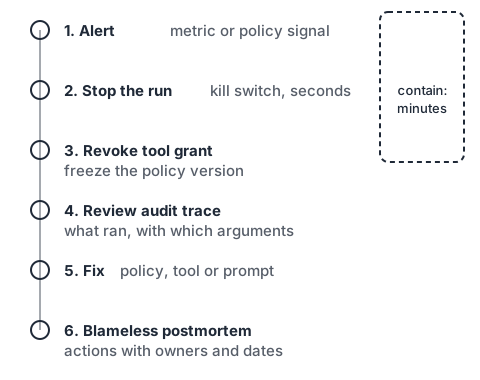
Containment is where the agent case differs most. Use this order, and keep it short enough to fit on one screen.
1. Stop the run(s)         kill switch, cancel pending tool calls
2. Revoke the tool grant   narrowest revocation that stops the damage
3. Freeze the policy       pin the strict policy version, block deploys
4. Preserve evidence       export traces and audit records for the window
5. Notify                  owner, security contact, affected system owners
Two details matter. First, revoke before you investigate. Reading a 400-step trace takes a while, and the agent should not be running meanwhile. Second, preserve first, then clean up. If the response deletes the run’s artefacts, the postmortem loses its evidence.
If the incident involves leaked credentials, rotate them as part of containment, and check whether the agent ever held a long-lived secret at all. The better design is short-lived, scoped credentials so that rotation is cheap.
Recover: fix the cause, not only the symptom
Recovery has three layers, and teams often stop at the first.
- Undo the effects. Reverse the changes the agent made. This is far easier if actions are idempotent and logged with enough detail to invert them.
- Close the path. Remove the tool, tighten the argument constraint, add an approval step for the risky action, or add the missing egress rule.
- Re-test. Add the incident as a regression case to your evaluations, so the same input pattern is checked on every future change.
Bring the agent back in stages: first read-only, then with the narrow tools, then with the full set. Watch the same signals that detected the incident.
Learn: a blameless postmortem for agents
Blameless postmortems carry over directly. The Site Reliability Engineering book puts it plainly:
Blameless postmortems are a tenet of SRE culture.
Source: Google SRE book, chapter 15, Postmortem Culture. For agent incidents, “blameless” has a useful extra meaning: do not blame the model. A model that follows an injected instruction did what models do; the question is why the platform allowed that to turn into a damaging action.
A postmortem template that works:
Summary        one paragraph, plain language
Impact         what changed, who was affected, for how long
Timeline       alert, stop, revoke, fix (with timestamps)
Trace          the decisive tool calls and the context that led to them
Root causes    missing control, wrong policy, bad tool design (not "the model")
What went well controls that worked (kill switch, budget cap)
Action items   owner, due date, verification method
Review action items in the next ops meeting rather than letting them age in a document.
A short drill you can run this week
Pick a test agent in a non-production environment. Give it a task, then:
- Start the clock when you inject an alert.
- Stop the run using the real kill switch.
- Revoke one tool and confirm the next call is denied.
- Pull the trace and answer: which call was the last one that should not have happened?
- Write three action items.
If any step took more than a few minutes, or needed a person with special access who was not on call, that is your first action item.
Key takeaways
- Agent incident response uses the standard phases, but containment must work in seconds.
- Build the kill switch, tool revocation and policy freeze before you need them, and rehearse them.
- Revoke first, investigate second, and preserve evidence before cleaning up.
- Keep postmortems blameless: ask why the platform allowed the action, not why the model produced it.
- Turn every incident into a regression test for your evaluations.
Sources
- NIST, SP 800-61 Rev. 3, Incident Response Recommendations and Considerations for Cybersecurity Risk Management (2025).
- Google, Site Reliability Engineering, Chapter 15: Postmortem Culture (2016 book, online edition).
- Anthropic, Disrupting an AI-orchestrated cyber espionage campaign (2025).