Ops series: AI supply chain security and patching for agents
AI supply chain security for agents: inventory and patch models, MCP servers, skills, SDKs and images. A checklist for pinned, reviewed artefacts.
This post is also available in Deutsch.
AI supply chain security for an agent platform starts with a plain list: every model version, MCP server, skill, SDK and container image the platform depends on, with a source, a pinned version, an update channel and an owner. Most incidents in this area come from things nobody listed, so inventory comes before scanning. After that, the rule is simple to state and harder to keep: pin and review artefacts, and do not let production download and run new ones at run time. This post gives a patching checklist for each artefact type.
Why the agent supply chain is wider than a normal one
A conventional service has code dependencies and a base image. An agent platform has those plus several parts that change behaviour without changing code.
- Models. A model version is a dependency whose behaviour you cannot read. An alias that moves to a new snapshot can change outputs overnight.
- MCP servers. These are programs that run with access to your systems and also supply text (tool names and descriptions) that the model reads. See MCP tool poisoning for why that second role matters.
- Skills and instructions. Files that tell an agent how to work are executable influence. The risks are covered in third-party skills and the supply chain.
- SDKs and libraries. The usual package ecosystem, now including agent frameworks that move fast.
- Container images and runtimes. Where all of it runs.
The risk framing is the same as for any software supply chain, which OWASP lists for LLM applications. On models in particular, its guidance reads:
Only use models from verifiable sources and use third-party model integrity checks with signing and file hashes
Source: OWASP LLM03:2025 Supply Chain. The same idea applies to every artefact in the list: know where it came from and be able to check that it is what you think it is.
Step 1: build the inventory
Create one table and keep it where the platform team will see it. Each row is one artefact.
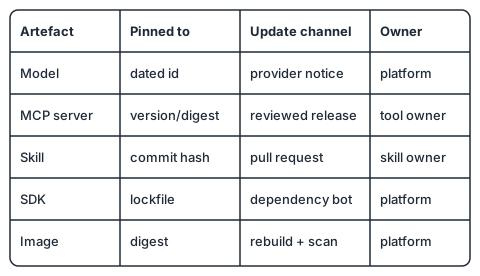
Columns that earn their keep:
| Column | Example |
|---|---|
| Artefact type | model, MCP server, skill, SDK, image |
| Name and source | where it is fetched from, and by whom it is published |
| Pinned version | a dated model id, a version or digest, a commit hash |
| Update channel | provider notices, release feed, dependency bot, manual review |
| Owner | a team that answers for it |
| Used by | which agents or pipelines depend on it |
The “used by” column is what makes patching quick: when a vulnerability or deprecation is announced, you can name the affected agents in minutes.
Where possible, generate the inventory instead of maintaining it by hand. A software bill of materials covers libraries and images well; for models, servers and skills you will probably need to extend it with your own records. NIST’s Secure Software Development Framework is a good anchor for the surrounding practice:
a core set of high-level secure software development practices that can be integrated into each SDLC implementation.
Source: NIST SP 800-218, Secure Software Development Framework (SSDF) Version 1.1. It was written for software producers in general. Applying it to agent artefacts means treating a skill or an MCP server like any other component you bring into your build.
Step 2: pin everything
Pinning turns “whatever is latest” into “exactly this”.
- Models: use dated or versioned identifiers, not moving aliases, in production. Move to a new version deliberately, after evaluations pass.
- MCP servers: pin the package version or image digest. Avoid launch commands that fetch the latest version on every start.
- Skills: reference a commit hash from a repository you control, not a branch or a URL that can change.
- SDKs: commit lockfiles and install from them in CI and in images.
- Images: reference digests for production, and rebuild on a schedule so base-image fixes arrive.
The rule that ties these together: no runtime downloads of code or instructions in production. If a component must change, it changes through a reviewed commit, a new artefact and a rollout, which is the subject of change management for agents.
Step 3: choose where artefacts come from
The more places artefacts can come from, the larger your review burden. Two developments help.
Registries for MCP servers are emerging. The MCP project announced one in preview:
The MCP Registry is now available in preview.
Source: Model Context Protocol blog, Introducing the MCP Registry (2025). The announcement also points at how an organisation can use it:
organizations can choose to create sub-registries based on custom criteria.
That is the pattern to aim for: a public source is an upstream, and your organisation exposes only a curated sub-set that has passed your review. Check the registry’s current status before relying on it, since the quote describes the state at announcement time.
Packaging matters too. Anthropic describes desktop extensions as:
bundling an entire MCP server—including all dependencies—into a single installable package.
Source: Anthropic, Claude Desktop Extensions. A single installable package is easier to hash, pin and review than a server that resolves its dependencies at start. Whatever format you use, prefer artefacts that carry their dependencies and can be verified as a unit.
Step 4: a patching routine
Run this on a calendar, not when someone remembers.
- Weekly: check the update channel for each inventory row. Triage findings by exposure: does the affected component handle untrusted input or hold credentials?
- On advisory: use the “used by” column to find affected agents, freeze or restrict them if the risk is high, and patch through the normal change path.
- Before every update: run your evaluation suite and a smoke test of each affected agent, and check that tool lists and descriptions did not change in unexpected ways (a changed description is a changed prompt).
- After every update: record the new pinned version in the inventory and keep the old one available for rollback.
- Quarterly: remove what nobody uses. Unused servers and skills are risk without benefit.
Checklist
- Inventory exists, with owner and update channel for every artefact.
- Production uses pinned models, digests and commit hashes; no moving aliases.
- No component downloads code or instructions at run time.
- New MCP servers and skills go through the same review as a new dependency.
- Tool names and descriptions are diffed on update.
- Rollback to the previous pinned version has been tried.
- There is a named person who receives advisories for each row.
Key takeaways
- The agent supply chain adds models, MCP servers and skills to ordinary dependencies; inventory them all.
- Pin versions and review changes; avoid runtime downloads in production.
- Prefer curated sub-registries and self-contained packages that can be hashed and reviewed.
- Patch on a schedule, with evaluations before and an easy rollback after.
- Treat a changed tool description as a changed prompt.
Sources
- OWASP Gen AI Security Project, LLM03:2025 Supply Chain.
- Model Context Protocol Blog, Introducing the MCP Registry (2025).
- Anthropic, Claude Desktop Extensions: One-click MCP server installation for Claude Desktop (2025).
- NIST, SP 800-218, Secure Software Development Framework (SSDF) Version 1.1 (2022).