Writing tools agents can actually use: names, schemas and errors
Tool design for AI agents is interface design for a model reader. A checklist for names, namespaces, narrow schemas and errors, and how small tools ease policy.
This post is also available in Deutsch.
Tool design for AI agents is interface design for an unusual reader: a language model that sees only the tool’s name, its description, its input schema and whatever the tool returns. It cannot read your source code or ask a colleague. If those four things are clear, the agent calls the tool correctly. If they are vague, it guesses. This post is a checklist for names, namespacing, narrow inputs and error messages that tell the model what to do next, plus the side benefit: small, precise tools make policy decisions much easier.
Why a tool is not just an API wrapper
A tool sits between a probabilistic caller and a deterministic system. Two things follow. First, the
caller will occasionally choose the wrong tool or send odd arguments, so the interface should make the
right call obvious and the wrong call impossible or cheap. Second, the thing that approves calls (a
person or a policy) has to understand what a call does from its name and arguments alone. A tool
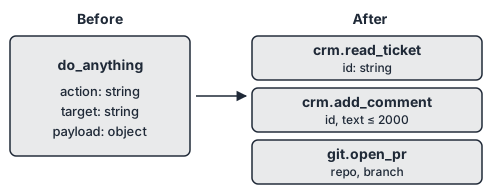
named do_anything with a free-form payload is hard for the model and impossible to govern.
The reasoning-and-acting pattern that many agent loops follow was described in the ReAct paper as having models
generate both reasoning traces and task-specific actions in an interleaved manner
— arXiv, ReAct: Synergizing Reasoning and Acting in Language Models
Each action in that loop is a tool call, and each result goes back into the model’s context. That is the reason tool results matter as much as tool inputs.
1. Names that say what happens
- Use a verb and a noun:
read_ticket,add_comment,open_pull_request. - Say what it does, not how:
search_customers, notrun_sql_query. - Avoid near-duplicates (
get_user,fetch_user,lookup_user). The model cannot tell them apart, and neither can a reviewer. - Make side effects visible in the name. A read tool and a write tool should not share a name with one flag that switches modes.
2. Namespaces for related tools
Once an agent can see dozens of tools, names collide and attention thins. Anthropic’s article on writing tools for agents recommends prefixes:
Namespacing (grouping related tools under common prefixes) can help delineate boundaries between lots of tools; MCP clients sometimes do this by default.
— Anthropic, Writing effective tools for AI agents—using AI agents
In practice: crm.read_ticket, crm.add_comment, git.open_pr. The prefix tells the model which
system a tool belongs to, and it gives policy a natural unit to grant or deny. An agent that works on
tickets gets crm.* and nothing under git.*.
3. Narrow inputs
A schema is both documentation and a validator. Use it as the second.
- Prefer enumerations over free text when the choices are known.
- Add patterns and length limits to strings: a ticket key matches
^SEC-\d+$, a comment is at most 2,000 characters. - Make required fields required and give the rest sensible defaults.
- Put units and formats into the field description (“ISO 8601 date”, “amount in cents”).
- Do not accept raw query languages, shell commands or URLs unless that is the tool’s whole purpose.
A short example in JSON Schema form:
{
  "name": "crm.add_comment",
  "description": "Add one internal comment to an existing ticket. Does not notify the customer.",
  "inputSchema": {
    "type": "object",
    "properties": {
      "ticketKey": { "type": "string", "pattern": "^SEC-\\d+$" },
      "comment":   { "type": "string", "maxLength": 2000 }
    },
    "required": ["ticketKey", "comment"],
    "additionalProperties": false
  }
}
The description states what it does and one thing it does not do. The schema rejects anything outside the declared shape, which means a deterministic layer can enforce it before the call runs.
4. Descriptions written for a reader who has no context
Write the description as if the reader had never seen your system:
- First sentence: what the tool does and when to use it.
- Second: what it does not do, or which other tool to use instead.
- Mention prerequisites (“requires an existing ticket key”).
- Keep it short. Every description is paid for on every turn it is offered.
5. Errors that tell the model what to do next
A bare 500 or error: invalid input makes the model retry blindly. A good error says what was
wrong and what a valid call looks like:
ticketKey "SEC-abc" does not match ^SEC-\d+$. Use the numeric key, for example SEC-1042.
Call crm.search_tickets to find the key.
Rules of thumb:
- Name the field and the rule that failed.
- Give one example of a valid value.
- Point to the tool that fixes the problem.
- Distinguish “you can retry” from “do not retry” so loops stop.
- Never put secrets, stack traces or internal paths into an error; the model will read them and they will end up in logs.
6. Results that are small and structured
Tool results enter the context. Return what the next step needs, not the whole record.
- Prefer a short list of named fields over a full dump.
- Paginate and say how many results remain.
- Return identifiers the model can pass to the next call.
- Remember that returned text is input to the model. If a result contains content from outside, such as a ticket body or web page, it can carry instructions. Mark or separate it, and keep tools that return outside content apart from tools that can write.
7. Small tools make policy easy
Narrow tools are good for the model and good for governance. A decision such as “may this agent add
a comment to a ticket whose key starts with SEC-?” is simple to write and simple to audit. The same
decision for do_anything(action, target, payload) requires parsing free text, which no rule can do
reliably. The gate described in Policy decides, audit proves
works best when every tool has a clear name, a typed schema and a limited effect.
The Model Context Protocol, explained in What is MCP?, adds two points that a tool author should keep in mind. The specification expects a person to be able to refuse calls:
there SHOULD always be a human in the loop with the ability to deny tool invocations.
— Model Context Protocol, Tools (2025-06-18)
and it tells clients how to treat what a tool says about itself:
clients MUST consider tool annotations to be untrusted unless they come from trusted servers.
— Model Context Protocol, Tools (2025-06-18)
So do not rely on a “read-only” hint as protection. If a tool must not write, make it unable to write: separate credentials, a read-only connection, a narrow schema.
8. Test tools with a model, not only with unit tests
Unit tests show that the function works. They do not show that a model picks it correctly. Run a small set of realistic tasks, read the transcripts, and look for wrong tool choices, malformed arguments and loops after errors. Fix the names, descriptions and errors first. If two tools are confused, merge or rename them. If a tool is never chosen, its description probably does not say when to use it. For the question of where a piece of guidance belongs at all, see Tool, skill or prompt?.
Checklist
- Verb-noun name with a namespace prefix
- One job per tool; read and write separated
- Schema with enums, patterns and length limits;
additionalProperties: false - Description: what, when, what not
- Errors name the field, give an example and point to the fix
- Results small, structured and paginated
- Granted per agent, decided per call, logged
- Tested with real model transcripts
Key takeaways
- A tool’s name, description, schema and results are the whole interface the model sees.
- Use clear verb-noun names and namespaces so related tools group and can be granted together.
- Narrow schemas are documentation, validation and a hook for policy at the same time.
- Write errors that say what was wrong, what is valid and what to call next.
- Do not trust a tool’s self-description as a control; enforce limits outside the model.
Sources
- Anthropic, Writing effective tools for AI agents—using AI agents (2025-09-11)
- Model Context Protocol, Tools (2025-06-18)
- arXiv, ReAct: Synergizing Reasoning and Acting in Language Models (2022-10-06)