Air-gapped agents: a checklist for running without the internet
Air-gapped AI means no downloads at run time. A checklist of what to vendor, pin and verify, and how to update agents through a reviewed import path.
This post is also available in Deutsch.
Air-gapped AI means the agent platform works with no route to the internet, and therefore must not fetch anything at run time: not models, not skills, not price lists, not instructions. Everything it needs is vendored, pinned and verified before it crosses the gap, and updates arrive through a reviewed import path. This post is a checklist for building and operating that.
What “air-gapped” asks of an agent platform
Most agent stacks are chatty by default. They resolve package versions on start, download a model on first use, pull a model catalog for pricing, check for updates, send telemetry and, in the worst case, load instructions from a URL. Each of these is a run-time dependency on something outside your control, and in an isolated network each one either fails or, worse, silently falls back to something unintended.
The goal is simple to state: a platform start, an agent run and a restart must work with the network cable pulled. Everything below follows from that sentence.
A framework helps to organise the work. The UK National Cyber Security Centre guidelines for secure AI system development split the lifecycle into four areas:
four key areas within the AI system development life cycle: secure design, secure development, secure deployment, and secure operation and maintenance
Source: NCSC, Guidelines for secure AI system development (2023-11-27).
Air gapping mostly lives in the last two: how artefacts are deployed and how they are updated afterwards.
The architecture: a reviewed import path
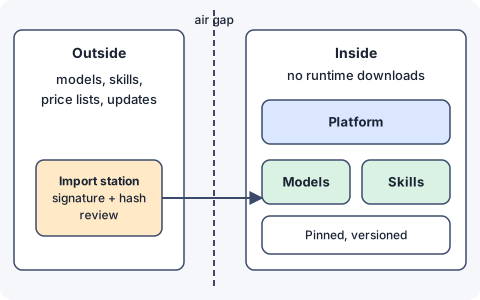
The air gap does not mean nothing ever changes. It means changes enter through one controlled door:
- An import station outside the gap downloads artefacts from their publishers.
- It verifies signatures and hashes, scans, and records provenance (source, version, date).
- A person reviews the change set.
- Approved artefacts are transferred across the gap, for example on write-once media or through a one-way transfer service, into an internal registry.
- Inside, the platform pulls only from that registry, by exact version or digest.
Nothing inside the gap should ever need to talk to the public internet, and nothing outside should be able to push in.
Checklist: what must be vendored and pinned
Go through each category and answer “where does this come from at run time?” The only acceptable answer is “from our internal registry or from a file in the deployment.”
Model weights
- Weights are stored in the internal registry, referenced by digest.
- The serving runtime is configured to never download a model. Ollama’s documentation notes that running locally means “We don’t see your prompts or data when you run locally.” (Ollama FAQ), which is about privacy; whether a runtime also reaches out to fetch models or check for updates is a separate setting you must verify and disable.
- Every model change goes through an evaluation run before it is imported.
Container images and packages
- Images are mirrored internally and pinned by digest, not by tag.
- Language dependencies come from an internal mirror with a lockfile; no
latest. - Builds are reproducible without network access (test this explicitly).
Skills, prompts and instructions
- Skills are imported as reviewed copies, with a provenance file (source URL, commit, date).
- No skill, prompt or tool description is fetched from a URL at run time. Remote instructions are a prompt-injection channel even with a network; without one they are simply broken.
- Third-party skills pass the review described in third-party skills as a supply chain.
Catalogs and data
- The model catalog (names, context sizes, prices) is a versioned file inside the deployment, not a live lookup.
- Price tables for cost tracking are updated through the import path.
- Vulnerability databases and licence data for scanners are mirrored and refreshed on a schedule.
Platform behaviour
- Update checks, telemetry, crash reporting and “phone home” licence checks are off.
- Outbound traffic is blocked at the network level, not just disabled in configuration. A firewall rule is evidence; a config flag is a hope.
- Time comes from an internal source. Certificates, tokens and audit timestamps depend on it.
- Certificate authorities, CRLs or OCSP responders are reachable internally.
Verifying what you import
OWASP’s guidance for supply chain risk applies directly to the import station:
Only use models from verifiable sources and use third-party model integrity checks with signing and file hashes
Source: OWASP, LLM03:2025 Supply Chain.
Turn that into steps the station always performs:
- Download only from the publisher’s official location.
- Check the signature where one exists, and compare the file hash against a value obtained through a second channel.
- Record the result next to the artefact, so a later auditor can see what was checked.
- Scan images and packages for known vulnerabilities and licence problems.
- Keep the previous version so a bad import can be rolled back.
A provenance record can be as plain as this:
artifact: model-small-q4.gguf
source: publisher release page
sha256: <value recorded at import>
verified: signature ok, hash matches second channel
imported: <date of import>
reviewed-by: platform team
evaluation: eval-suite run 14, no regressions
Updating and patching without a connection
An air gap delays patches; it does not remove the need for them. Decide on a cadence (for example monthly, with an emergency path for critical fixes), and rehearse the full path from publisher to production at least once before you need it under pressure. The same discipline as in patching the agent supply chain applies, with an extra step for the transfer. Local model operation has its own upkeep, covered in self-hosted models for agents.
Testing the gap
Claims about isolation should be tested, not assumed:
- Start the whole platform in a network namespace with no route out and run a standard set of agent tasks.
- Capture outbound connection attempts during startup and a run; the list should be empty or fully explained.
- Rebuild an image on the build host with network access disabled.
- Run the same checks after every upgrade, because new versions bring new default behaviour.
What an air gap does not do
- It does not make the models safe. Prompt injection works with no internet, through documents, tickets and tool outputs.
- It does not protect against a malicious artefact that passed review.
- It does not remove the need for access control and audit inside the network.
- It costs speed: updates are slower, and some features that depend on live data will not work.
Key takeaways
- Define the goal as “start, run and restart with no network”, and test it.
- Vendor and pin models, images, packages, skills, catalogs and price lists; reference them by digest.
- Updates enter only through an import station that verifies signatures and hashes, records provenance and requires review.
- Block outbound traffic in the network, not only in configuration.
- Keep a patch cadence and rehearse the import path before an emergency.
Sources
- Guidelines for secure AI system development, UK National Cyber Security Centre, 2023-11-27.
- LLM03:2025 Supply Chain, OWASP Gen AI Security Project.
- FAQ, Ollama documentation.