Code execution agents or direct tool calls? Trade-offs for builders
Code execution agents can cut token use sharply by filtering data in a sandbox, but need isolation. Compared with direct tool calls on cost, safety and audit.
This post is also available in Deutsch.
Direct tool calls are simpler, easier to audit and fine for most agents. Code execution, where the model writes a script against tool APIs and a sandbox runs it, can cut token use dramatically when tasks involve many tools or large intermediate results, but it needs real isolation and moves policy enforcement to a new place. Choose by workload: few tools and small results favour direct calls; many tools, big data and multi-step loops favour code. This post compares both on cost, safety and auditability.
The two models
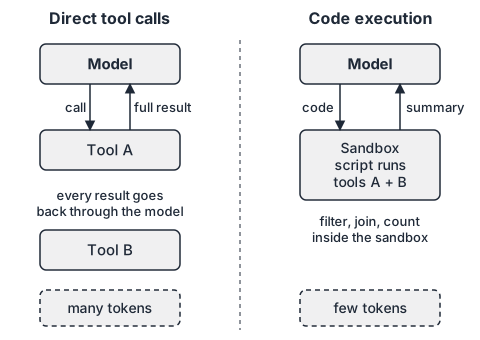
Direct tool calls. The model emits a structured call, the harness executes it, and the full result goes back into the model’s context. The model then decides the next call. Every intermediate result passes through the model.
Code execution. The tools are exposed as functions in a programming language. The model writes a short program that calls them, filters or aggregates the results in code, and returns only what it needs. Only the program’s output goes back into the context.
The idea has academic roots. The CodeAct paper proposes using code as the action format:
This work proposes to use executable Python code to consolidate LLM agents’ actions into a unified action space (CodeAct).
Source: Executable Code Actions Elicit Better LLM Agents, arXiv. The appeal is that code gives the model loops, conditions and variables for free, so one step can do what would take many separate tool calls.
Where the token cost comes from
Two effects drive cost in direct tool calling. First, tool definitions: every tool’s name, description and schema sits in the context. Second, intermediate results: a document fetched from one system and written to another passes through the model twice.
Anthropic’s engineering team describes the first effect at scale:
In cases where agents are connected to thousands of tools, they’ll need to process hundreds of thousands of tokens before reading a request.
And it reports the effect of moving to code execution in a worked example:
This reduces the token usage from 150,000 tokens to 2,000 tokens—a time and cost saving of 98.7%.
Source for both: Code execution with MCP: building more efficient AI agents, Anthropic. Treat 98.7 percent as the result of one example, not as a promise. Your savings depend on how much data your tasks move and how much of it the model actually needs to see. If every tool result is a short status line, there is little to save, and caching and token budgets (see prompt caching and token budgets) are the better lever.
Safety: what changes with code execution
With direct calls, the harness sees each call before running it. That is a natural place to check policy: is this tool allowed, are the arguments in range, does a person need to approve? The call is data, and data can be validated.
With code execution, the model hands you a program. The program can loop, build arguments dynamically and call many tools in one go. You can still enforce policy, but you have to do it in two places:
- At the boundary of the sandbox. Every tool function exposed inside the sandbox is a thin client that calls the real tool through a gate. The gate applies the same allowlist, argument validation, rate limits and approval rules as for direct calls.
- Around the sandbox itself. The code runs on your infrastructure, so it must be isolated from everything it does not need.
Anthropic’s article on sandboxing in Claude Code makes the second point clearly:
It is worth noting that effective sandboxing requires both filesystem and network isolation.
Source: Making Claude Code more secure and autonomous with sandboxing, Anthropic. Without network isolation, a compromised script can exfiltrate data; without filesystem isolation, it can reach credentials or modify files it should not. The same article reports a practical benefit of a working sandbox:
In our internal usage, we’ve found that sandboxing safely reduces permission prompts by 84%.
Isolation is therefore not only a cost. It can allow more autonomy, because the safe default is enforced by the environment instead of by asking a person each time. For concrete isolation options and what to check, see sandboxing agents.
Auditability
Direct calls produce a clean log: one record per call, with arguments and result. Code execution produces fewer, larger events: the program text, the tool calls it made through the gate, and its output. To keep it auditable:
- Log the program text and its hash with the run.
- Log every gated tool call made from inside the sandbox, with the same fields as direct calls.
- Record resource limits and whether the program hit them (time, memory, output size).
- Keep the sandbox image version in the run record so a run can be reproduced.
If you cannot answer “which tool calls did this script make, with which arguments?” from the log, the setup is not ready for sensitive work.
Decision guide
| Situation | Prefer |
|---|---|
| Few tools, small results | Direct tool calls |
| Strict per-call approval by a person | Direct tool calls |
| Hundreds of tools, most irrelevant to a given task | Code execution (load tool definitions on demand) |
| Large intermediate data (tables, documents) that the model only needs to summarise | Code execution |
| Loops, joins or filters over many records | Code execution |
| No place to run an isolated sandbox | Direct tool calls |
| Compliance requires a per-call audit record | Either, with gated calls logged in both cases |
A hybrid is common: expose a handful of well-designed direct tools for sensitive actions (create a ticket, send a message) and let code execution handle the read-heavy data wrangling. Good tool design matters in both modes; see writing tools agents can use.
A minimal gate for sandboxed tool functions
The sketch below shows the idea: inside the sandbox, a tool function does not talk to the system directly. It sends a request to a gate that enforces policy.
# runs inside the sandbox; tools.call() goes to the gate, not to the network
from tools import call

rows = call("tickets.search", {"status": "open", "limit": 500})
urgent = [r for r in rows if r["priority"] == "high"]
print({"count": len(rows), "urgent_ids": [r["id"] for r in urgent][:20]})
Only the printed summary re-enters the model’s context. The gate can reject tickets.search calls with out-of-range limits, count calls per run and require approval for write tools, exactly as it would for a direct call.
Limits and open problems
- Generated code can be wrong in ways that are harder to spot than a malformed tool call. Test the scripts’ behaviour, not only their syntax.
- A sandbox reduces risk; it does not remove it. Keep secrets out of it and give it only the tool functions the task needs.
- Latency can go either way: fewer model round trips, but sandbox start-up time.
- Results from one example, such as the token reduction above, do not transfer automatically to your workload. Measure on your own tasks.
Key takeaways
- Direct tool calls are the simple default; they make policy checks and audit straightforward.
- Code execution pays off when many tools or large intermediate results inflate context.
- Enforce policy at the sandbox boundary with a gate, and isolate both filesystem and network.
- Log program text, gated calls and resource limits so runs stay auditable.
- A hybrid of direct tools for sensitive writes and code for data handling is often the practical answer.